 Buy Now, Pay Later
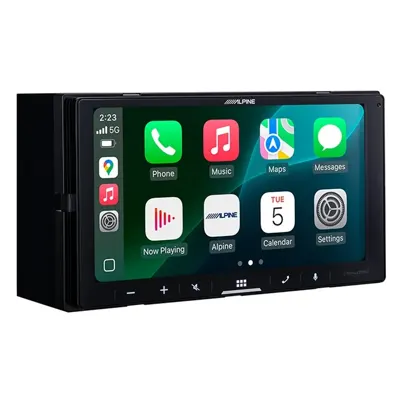
Alpine iLX-W770 6.75-inch Wireless CarPlay Receiver
- Wireless CarPlay/Android Auto
- 2.4 in deep
- 4V preamps
$429.99
Your car runs great, but the radio is stuck in the past. A new head unit with Apple CarPlay or Android Auto is one of the most useful upgrades we do, and here is exactly what goes into it.
The receiver is the part you see. Behind it there are usually three or four other parts that make it look and work like it came from the factory.
A dash kit fills the opening and matches the shape of your dash. A wiring harness adapter plugs into the factory connector, so we do not cut your car's wires. An antenna adapter connects the factory antenna to the new radio. Skip any of these and you get gaps, rattles, or a radio that loses its settings every time you shut the car off.
If your car has volume and track buttons on the wheel, you want to keep them. A steering wheel control interface translates those button signals so the new radio understands them. On many cars that module also keeps things like the factory chimes, the backup sensors, or the factory amp working.
Some cars have a factory amplified system. Those need a specific interface, or the new radio will sound thin or not play at all. This is why we always ask you to tell us the year, make and model, plus the trim level. Two cars that look the same can be wired very differently.
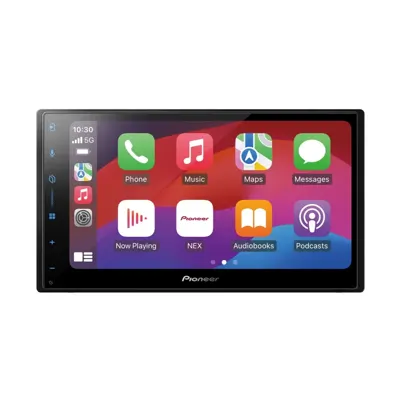
Double-DIN means a radio opening about 4 inches tall. If your car has one, a standard double-DIN unit like the Alpine iLX-W770 or the Pioneer DMH-W3000NEX usually drops in with a kit. Both do wireless CarPlay and Android Auto, so your phone connects when you start the car.
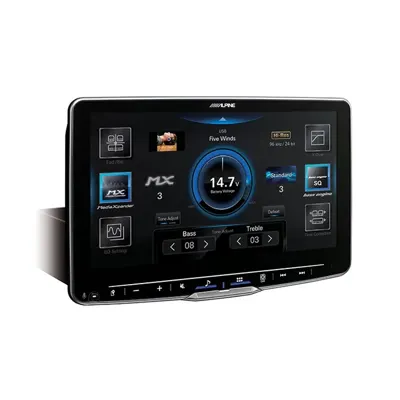
Floating-screen units like the Alpine Halo9 iLX-F509 mount a big 9-inch screen on an arm in front of a single-DIN chassis. They are a great way to get a large screen into a car that only has a small radio slot. The catch is that the screen can block vents, the hazard button, or controls on some dashes. We check your dash in person before we recommend one.
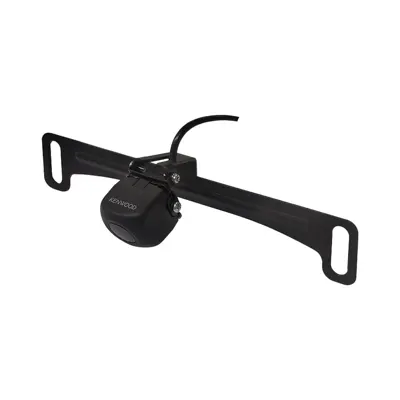
Almost every CarPlay receiver has a camera input. A plate-mount camera like the Kenwood CMOS-230LP1 runs a wire from the rear of the car to the radio and a reverse trigger wire tells the screen to switch over when you shift into reverse.
Doing it at the same time as the radio saves labor, because the dash is already apart. If your car already has a factory camera, there is often an adapter that keeps it working with the new screen.
Tony and the install team do this work in our own bay, often the same day. If you already bought a radio somewhere else, bring it in and we will give you an estimate for installing it.
Call (323) 944-7844 or text (213) 674-9042 with your year, make and model, and we will tell you which parts your car needs. Se habla español.
In the shop
Buy Now, Pay Later
$429.99
 Buy Now, Pay Later
$479.99
 Buy Now, Pay Later
Shop by vehicle
Pick your year, make and model to see the stereos, speakers and boxes that fit it, with prices. Pickup and install in South Gate.
Fastest way to a price
Car audio: send the year, make, and model, and Tony gets back to you with what fits and a price. DJ gear: tell Joe the speakers, mixer, controller or lighting you want, and he will tell you what is on the floor.
Pick the radio around your car and how you use your phone, not around the biggest screen on the wall. Decide wired or wireless, figure out what shape your dash allows, and plan to keep your steering wheel buttons and factory features. Then we confirm the exact parts for your vehicle before anything comes apart.
Read it: How to Pick an Apple CarPlay or Android Auto Head UnitFor most cars, the simple setup is a receiver with a camera input plus the Kenwood CMOS-230LP1, which Kenwood lists as working with most aftermarket receivers that have a camera input. For a sharper picture, the Kenwood CMOS-740HDLP shoots 1280 x 720 HD, but it connects through HD-TVI and works only with select Kenwood receivers that support HD cameras. If you also want a front or side camera, pick a receiver with more than one camera input, like the JVC KW-M875BW, Kenwood DMX958XR or Alpine iLX-F509.
Read it: Backup Camera Guide: Kenwood Cameras and the Receivers with Camera Inputs We CarryFrom $100 to $250, you get a Bluetooth receiver for a single-DIN dash, like the JVC KD-X280BT or Alpine UTE-73BT, or the BOSS Audio BE7ACP with wired CarPlay. From $250 to $500, you get a double-DIN touchscreen with wired CarPlay, like the Kenwood DMX4710S or Pioneer DMH-1800NEX, or wireless CarPlay, like the JVC KW-M785BW or Alpine iLX-W770. From $500 to $1,000 come HD screens, more camera inputs and features like built-in GPS. At $1,000 and up are the 9- to 11-inch floating screens. Every price in this guide is the listed price on the product page.
Read it: Car Stereo Buying Guide by Budget: Bluetooth, CarPlay, Wireless and Floating ScreensMost cars can take one with the right dash kit and harness, but every dash is different. Tell us the year, make and model and we will check what fits and what parts it needs.
Not if we add a steering wheel control interface. It lets the new radio read the factory buttons so volume and track changes still work.
If you make a lot of short trips, yes. Your phone connects on its own without plugging in. Wired still works fine and charges the phone while you drive.